
 John Jevi dela Cruz
Tax return pre-fill is helping Australians complete their 2025–26 returns. By September, the ATO should hold most information from employers, banks, health funds and government agencies. However, the information can still contain gaps, duplications or errors.
That matters now because many taxpayers are gathering records and approving returns for lodgement. Sole traders also need to review new business information appearing in their 2026 returns.
Before you press lodge or approve a return prepared by your accountant, check these seven costly mistakes.
Why Pre-Filled Data Needs Attention Now
The ATO collects information from employers, banks, share registries, super funds, government agencies and private health insurers.
According to the ATO’s pre-filling guidance, most organisations send their information by late July. However, each organisation controls when it sends its data.
Tax return pre-fill can make your return easier to prepare, but it does not transfer responsibility to the ATO. You still need to check every figure, add missing income and confirm each deduction.
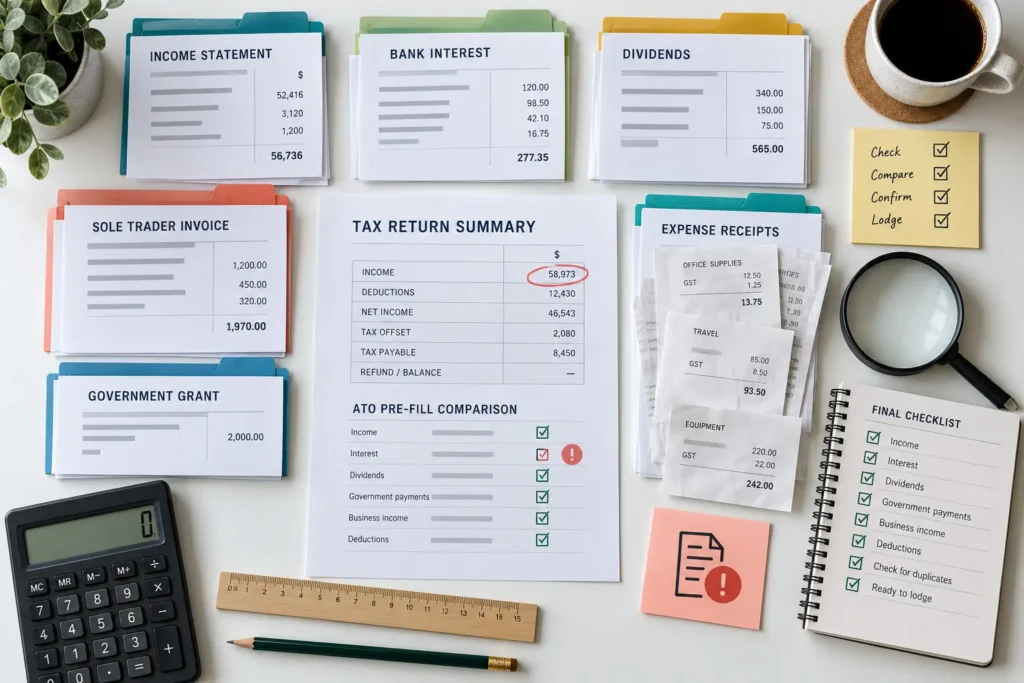
1. Assuming Tax Return Pre-Fill Is Complete
The information in your return may not include everything you need to declare.
Some organisations may send their data late. Meanwhile, other income will not flow into your return automatically. Check for:
- income from a second or short-term job
- interest from less frequently used accounts
- private company or trust distributions
- foreign income
- capital gains
- cryptocurrency transactions
- rental income
- sole-trader income
- cash and platform payments
- government grants
Compare the tax return pre-fill with your bank statements, income statements, dividend notices, investment reports, invoices and payment summaries.
If an amount does not appear, determine where it belongs. Do not assume missing income falls outside the tax system.
2. Lodging Before Income Statements Are Ready
Wait until your employer marks each income statement Tax ready before you lodge.
Until then, your employer can change wages, allowances, salary sacrifice amounts or tax withheld. The ATO’s income statement guidance warns that taxpayers who use unfinished information may need to amend their returns later.
Compare your tax return pre-fill with every income statement, especially if you:
- changed jobs during the year
- worked for several employers
- received allowances or bonuses
- salary sacrificed into super
- stopped working for an employer before 30 June
- received a payment after leaving a job
Contact your employer if a tax-ready statement contains an error. Your employer must correct its payroll reporting. Deleting the figure from your return will not fix the source record.
3. Missing Interest and Investment Income
Pre-filled bank interest, dividends and managed fund distributions can save time. Even so, you should compare those figures with your annual statements.
Start by checking the account holder and ownership percentage. For example, joint-account holders may need to divide interest between them. Children’s accounts, business accounts and accounts held for another person may also require closer review.
For investments, compare the tax return pre-fill with:
- annual tax statements
- dividend statements
- managed fund distribution statements
- share trading records
- dividend reinvestment information
- capital gains calculations
A dividend entry does not calculate the capital gain or loss from shares you sold. Likewise, a managed fund distribution may contain several tax components.
Use the complete tax statement rather than relying only on the amount deposited into your bank account.
4. Checking New 2026 Tax Return Pre-Fill for Sole Traders
Tax time 2026 brings broader information for individuals in business.
ATO system documentation includes expanded data for:
- ABNs
- main business names and addresses
- previous closing stock carried forward as opening stock
- payments recorded through Taxable Payments Annual Reports
- certain government grants
The ATO’s 2026 implementation material also explains that myTax may request a reason when someone changes a reported contractor payment or government grant.
Review these amounts carefully.
A contractor payment may belong to another ABN, contain an incorrect amount or already sit elsewhere in your return. In addition, TPAR information may not capture every payment you received.
Sole traders who use accrual accounting may also need to include invoices that clients had not paid by 30 June. Payment-based tax return pre-fill will not necessarily capture those invoices.
Match the figures against invoices, accounting records and bank deposits before choosing their tax treatment.
5. Reporting Pre-Filled Income Twice
Additional information can reduce omissions. However, it can also cause duplication.
For example, a sole trader may enter total sales from accounting software and then add a contractor payment that appears in myTax. If the sales total already includes that payment, the taxpayer reports the same income twice.
Similar problems can occur when:
- you enter interest manually and accept the same pre-filled amount
- a grant appears under both business income and other income
- you enter a managed fund distribution from its annual statement and myTax
- contractor income appears under business income and personal services income
- more than one business schedule includes the same payment
Reconcile your figures before changing anything. Compare total business income in your accounts with every income category in the return.
Do not delete a tax return pre-fill amount merely to make the totals match. First, find where you recorded the income and keep a note explaining any adjustment.
6. Expecting Tax Return Pre-Fill to Include Deductions
ATO data generally focuses on income and information from third parties. It does not identify every deduction you can claim.
Depending on your circumstances, you may need to review:
- work-related vehicle or travel expenses
- working-from-home expenses
- tools and equipment
- professional memberships
- union fees
- protective clothing
- income protection insurance
- tax-agent fees
- donations
- investment expenses
- sole-trader operating costs
A bank transaction alone does not prove that an expense qualifies. You need evidence showing what you purchased, how the cost related to your income and whether you excluded any private use.
Check deductions separately from the tax return pre-fill. Our tax records checklist can help you identify the supporting documents you need.
7. Approving the Return Without a Final Comparison
Before approving your return, compare its information with:
- your prior-year return
- all 2025–26 income statements
- bank and investment records
- accounting software reports
- property statements
- deduction schedules
- capital gains calculations
- private health insurance information
A change from last year may be correct. However, a missing employer, bank account, property, business schedule or deduction category deserves investigation.
Also check your name, address, bank account, residency status, spouse information and private health insurance details. These entries can affect your assessment even though they are not deductions.
Finally, read the declaration. When you lodge or approve the return, you confirm that its information is complete and correct to the best of your knowledge.
A final comparison of your records against the tax return pre-fill can uncover an error before it causes an amendment or processing delay.
Your Final Review Checklist
Before lodging:
- Confirm that every employer has marked your income statement tax ready.
- Compare the tax return pre-fill with your source documents.
- Add income that does not appear automatically.
- Reconcile sole-trader sales with TPAR and grant data.
- Check that no income appears twice.
- Review deductions and supporting records.
- Investigate major differences from last year.
- Confirm your personal, health insurance and bank details.
- Ask questions before approving the return.
The HarvestWise guide to the 2026 tax return deadline explains the key lodgement dates. However, speed should not replace an accurate final review.
How HarvestWise Can Help With Pre-Filled Returns
HarvestWise Accounting can compare your tax return pre-fill with your records, find missing income and review deductions before lodgement.
We can also reconcile sole-trader income, check contractor payments and government grants, review investment information and explain unexpected differences.
Explore our tax return services or contact HarvestWise Accounting before approving your 2025–26 return.
General information only. Tax treatment depends on your circumstances. Speak to a registered tax professional for advice.